Docs as Code: How We Ship Documentation with Markdown, GitHub Actions, and ChaiBuilder
Published on Jul 25, 2026
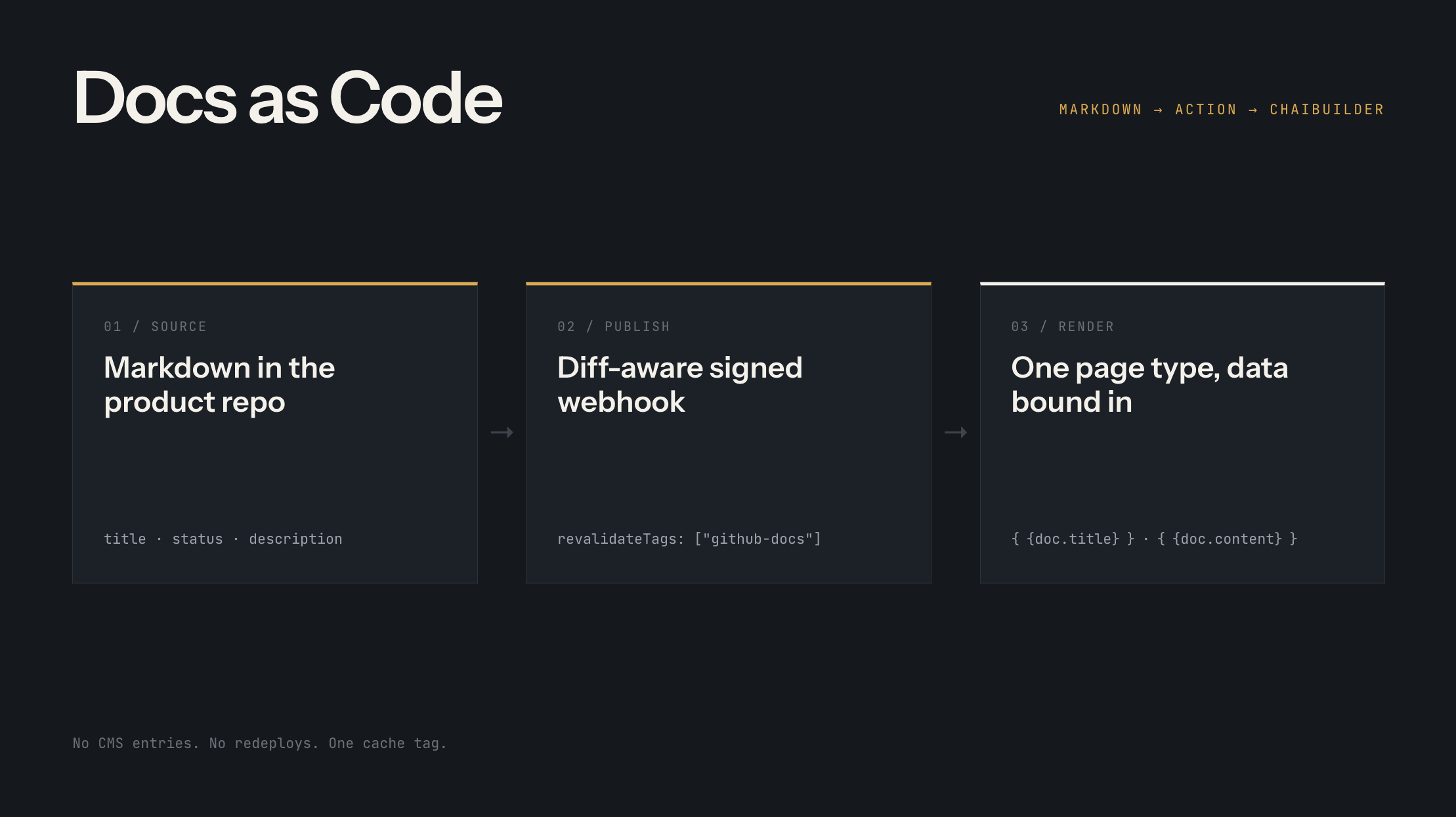
Most teams end up with documentation living in one of two places: a docs SaaS that owns the content, or a dedicated static site generator that owns the design. We wanted neither. Our docs live as plain markdown files in the same GitHub repo as our product knowledge base, they are written and maintained with AI agents that read that knowledge base, and they render inside our ChaiBuilder site, where the docs layout is just another visually designed page.
The glue between the two is small and boring on purpose: a GitHub Action that detects exactly what changed and posts a signed webhook, and a webhook endpoint on the site that invalidates exactly as much cache as the change deserves. No build step for content, no redeploys, no CMS entries to keep in sync.
This post walks through the whole pipeline, including the ChaiBuilder concepts that make the rendering side work: custom page types, data providers, data binding, and custom blocks.
Why not a docs template on a subdomain
The common shortcut is a docs framework with its own hosting: spin up a documentation template, deploy it separately, and put it on docs.example.com or reverse-proxy it under /docs. It works, but you pay for it twice.
First, it is a second website. A docs template ships its own header, its own fonts, its own color system, its own dark mode. Making it match the main site means re-implementing your design in someone else's theming layer, and then keeping the two in sync forever. Every brand refresh becomes two projects, and users still feel the seam when the navigation subtly changes shape as they cross from the marketing site into the docs.
Second, the boundary itself costs you. A subdomain splits your content across origins, which matters for search, analytics, cookies, and shared UI state. A proxied subpath avoids some of that but adds rewrite rules, a second deploy pipeline, and one more thing that can be down independently.
We wanted docs on the same domain, served by the same Next.js app, wearing exactly the site's theme. Because the docs template is a ChaiBuilder page, that last part comes free: it is built from the same blocks, the same design tokens, and the same global header and footer as every other page on the site. There is no second theme to maintain and no seam to hide. When the site's design changes, the docs change with it, because they were never a separate site to begin with. The only piece that is truly docs-specific is the content pipeline, which is the rest of this post.
The big picture

Three properties fall out of this design:
- The repo is the only source of truth. The site never stores doc content. It rebuilds its cached bundle from the GitHub tree, so a deleted or renamed file disappears on its own, with no matching delete needed anywhere else.
- Publishing is a git push. Merge to main and the docs are live seconds later. Rollback is
git revert. - The docs template is a ChaiBuilder page. Editors can restyle the docs layout visually without touching the pipeline, because content and presentation are wired together with data binding, not hardcoded.
Part 1: The content side
File naming is the information architecture
There is no navigation config file, no sidebar.json, no ordering field in frontmatter. A file's location in the repo is its identity:
docs/product/
  01-getting-started/
    01-introduction.md        -> /getting-started/introduction
    02-how-it-works.md        -> /getting-started/how-it-works
    03-quickstart.md          -> /getting-started/quickstart
  05-media/
    01-overview.md            -> /media/overview
    02-storage-configuration.md
  06-ai/
    01-overview.md            -> /ai/overview
    02-setup.md               -> /ai/setup
    03-customization.md
Every folder and file can carry a numeric prefix like 06-ai. The prefix does two jobs and then vanishes:
- It sets the sort order among siblings.
01-getting-startedrenders above06-aiin the sidebar. - It never reaches the URL.
06-ai/02-setup.mdbecomes/docs/ai/setup.
Reordering the sidebar is a file rename. Nesting folders creates sidebar sections. An index.md inside a folder becomes the page for the folder itself rather than a child of it; a folder without one renders as a collapsible group label with no link. The parser that enforces this is about 30 lines:
// 06-ai -> slug "ai", order 6. A segment with no prefix sorts first.
const PREFIXED_SEGMENT = /^(\d+)-(.+)$/
const VALID_SLUG = /^[a-z0-9]+(?:-[a-z0-9]+)*$/

function parseSegment(segment: string): PathSegment | null {
  const match = PREFIXED_SEGMENT.exec(segment)
  const slug = match ? match[2] : segment
  const order = match ? Number(match[1]) : 0
  return VALID_SLUG.test(slug) ? { slug, order } : null
}
A file that breaks convention is skipped with a warning rather than failing the whole set. One badly named file should not take the docs down.
Frontmatter: a small contract
Every doc opens with a frontmatter block:
---
title: AI Setup
description: Add provider credentials and switch on the AI assistant.
audience: [developer, editor]
category: ai-assistant
status: published
last_updated: 2026-07-21
tags: [ai, setup, configuration]
---
The pipeline only consumes four of these fields, and that restraint matters later:
titleis the page heading and the sidebar label.statusgates visibility. Anything that is notpublishednever enters the site's bundle at all, so a draft is invisible everywhere at once: no page, no sidebar entry, no sitemap line.descriptionfeeds the page metadata.last_updatedfeeds the sitemap.
Everything else (audience, category, tags) stays repo-internal. Those fields exist for the AI agents and humans working in the repo, not for the renderer. Keeping the consumed surface small is what lets the GitHub Action make a smart decision about cache invalidation, which we will get to next.
One small courtesy in the renderer: if the markdown body opens with an # H1 that repeats the frontmatter title, it is stripped, because the page template renders the title itself. An H1 that says something different is the author's and stays.
Why docs at code level beat rows in a CMS
We could have kept docs in the CMS. They started there. The reason we moved them out is not aesthetics, it is that documentation is a hypertext, and a CMS treats it as a pile of independent records.
Docs link to each other constantly. A setup page points at the overview, the overview points at the quickstart, the FAQ points at half the site. Every page also repeats small facts: an env var name, a config key, a product term, a pricing detail. The moment one page changes, some set of other pages is now slightly wrong, and nothing in a CMS tells you which ones.
In a CMS, keeping that web consistent is a manual crawl:
- Rename a page and every link to it across every other page is now stale. You find them by opening pages one at a time and reading, because the database has no idea which rich-text blobs contain that URL.
- Rename a concept and you are doing the same crawl for prose, not just links.
- There is no diff, so a reviewer cannot see "this change touched 9 pages" as one unit. Each page is its own save, its own version history, its own chance to be forgotten.
- You cannot grep a database. The one tool that makes cross-page consistency cheap does not exist there.
In a repo, the same problems collapse into text operations:
# Who links to the AI setup page?
grep -rn "/docs/ai/setup" docs/product

# Every page that mentions the old env var name
grep -rln "CHAI_AI_KEY" docs/product
And more importantly, they collapse into something you can hand to an agent. When we rename a page, change a config key, or reposition a feature, we do not open pages one by one. We ask the AI to do the sweep: find every doc that links to or mentions the thing, update all of them, and put the whole change up as one pull request. The agent has the entire docs set and the product knowledge base in one working tree, so "make every page agree" is a task it can actually complete, and verify with the same grep we would use.
The result comes back as a single diff. A reviewer sees every touched page in one place, CI runs on it, and merging it publishes all of the updates atomically through the pipeline above. There is no window where the renamed page is live but twelve pages still link to the old URL, which is exactly the window a CMS gives you when each page is saved by hand, one at a time.
That is the honest trade-off summary: a CMS is the right home for content that lives as independent records, which is why our blog and legal pages stay in Payload. Docs are the opposite kind of content, a densely linked graph that has to move together, and text in git is the only format where both humans and AI can operate on the whole graph at once.
AI in the loop
The docs live beside the product knowledge base in the same repo. That colocation is the whole trick: when an agent updates a doc, it reads the current product facts from the knowledge base in the same working tree, and the diff it produces goes through the same pull request review as any human edit. The publishing pipeline does not know or care whether a human or an agent wrote the change. Git is the audit log either way.
Part 2: The GitHub Action
When docs change on main, a workflow figures out what changed and tells the site. The key design decision: no content is uploaded. The site reads markdown from the repo itself, so the webhook only carries the list of paths that moved and a hint about how much cache to drop.
Diffing from the last successful publish, not the last push
The naive approach diffs HEAD~1..HEAD. That silently loses changes whenever a run fails: the next run diffs from the newer commit and the failed run's files are never resent. Instead, every successful publish tags the commit with v<n>, and the next run diffs from the highest tag:
- name: Find the last published tag
  id: base
  run: |
    LAST=$(git tag --list 'v*' | sed 's/^v//' | grep -E '^[0-9]+$' | sort -n | tail -1 || true)
    if [ -n "$LAST" ]; then
      echo "sha=$(git rev-parse "v$LAST^{commit}")" >> "$GITHUB_OUTPUT"
    fi
    echo "next=v$(( ${LAST:-0} + 1 ))" >> "$GITHUB_OUTPUT"
A failed run leaves the tag where it was, so its changes fold into the next run's diff instead of being lost. No tag yet means "resend everything", which is exactly the right first run. A manual workflow_dispatch also resends everything, which doubles as the recovery lever when the site's cache needs rebuilding from scratch.
Runs are queued rather than cancelled (cancel-in-progress: false), because each run names a different set of changed files and dropping one loses that information.
Deciding how wide to invalidate
The changed files come from git diff --name-status -M, with renames counted as a removal plus an addition, since the old URL has to stop resolving and the new one has to start. Then the interesting question: does this change affect only the changed pages, or the whole collection (sidebar, navigation, listings)?
The answer lives in the frontmatter diff. The navigation only shows a doc's URL (from the file path), its label (from title), and whether it is listed at all (from status). So:
// Does the change move a page in or out of the navigation, or relabel it?
export function metaAffectsCollection(before, after) {
  return before.title !== after.title || before.status !== after.status
}

export function needsCollectionInvalidation({ added, removed, modified, fullResend }, readMeta) {
  if (fullResend) return true
  // Any added or removed page changes the set of URLs, so the navigation changes.
  if (added.some(isMarkdown) || removed.some(isMarkdown)) return true
  // A modified page only matters if its title or status changed.
  return modified
    .filter(isMarkdown)
    .some((path) => metaAffectsCollection(readMeta('before', path), readMeta('after', path)))
}
The script reads both versions of each modified file with git show <sha>:<path> and compares just those two fields. Fixing a typo in a doc body invalidates one page and leaves the rest of the site's cache warm. Renaming a doc or retitling it drops the collection tag and the navigation rebuilds.
The payload: shaped like GitHub, signed like GitHub
The webhook body deliberately mimics a native GitHub push delivery, with one extra field:
export function buildPayload({ ref, added, modified, removed, invalidateCollection }) {
  return {
    ref,
    commits: [{ added, modified, removed }],
    revalidateTags: invalidateCollection ? ['github-docs'] : [],
  }
}
It is signed with the same HMAC scheme GitHub uses (x-hub-signature-256: sha256=<hmac>), so the receiving endpoint treats a native GitHub webhook and our Action's smarter delivery identically. If the Action ever breaks, pointing a plain GitHub webhook at the same URL keeps docs publishing, just with coarser invalidation, because a native push carries no revalidateTags and the endpoint falls back to dropping the whole collection.
Part 3: The ChaiBuilder side
Now the receiving end. Three ChaiBuilder concepts carry the whole thing: a custom page type backed by GitHub instead of a database, data binding to connect that data to visually designed blocks, and a custom block for the sidebar.
The webhook route: invalidate, never write
The endpoint verifies the HMAC signature against the raw body, checks the ref against the configured branch, filters the changed paths down to markdown under the docs root, and then invalidates:
// How wide to go: ["github-docs"] drops the whole collection,
// [] revalidates only the changed pages. Absent (a native GitHub
// push) falls back to dropping the collection.
const dropCollection = revalidateTags ? revalidateTags.includes(DOCS_CACHE_TAG) : true

if (dropCollection) {
  // Bust the bundle first: page revalidations below are only worth
  // anything once the next read goes back to GitHub.
  await revalidateTag(DOCS_CACHE_TAG, 'max')
}

for (const file of changed) {
  const parsed = parseRepoPath(file, source.basePath)
  if (!parsed) continue
  // Resolves the docs template's own base slug, so a removed file's URL
  // is revalidated into a 404 the same way a changed one is refreshed.
  await revalidateCollectionItem(chaiConfig, {
    pageType: 'docs',
    itemSlug: parsed.fullPath,
    appId,
  })
}
Nothing is written. The payload is only ever read for which paths changed, so a replayed or malformed delivery costs a cache rebuild at worst. That property is what makes it safe to accept deliveries from two different senders.
The cached bundle: one fetch serves everything
When the next request arrives after invalidation, the site rebuilds its docs bundle from GitHub: one recursive tree call to list every markdown file under the docs root, then the blobs in small concurrent batches. The result is parsed, filtered to status: published, rendered to HTML, and assembled into two structures:
export type DocsBundle = {
  byPath: Record<string, DocEntry>   // "/ai/setup" -> rendered doc
  tree: DocsTreeNode[]               // the folder hierarchy for the sidebar
}
The whole bundle sits in Next.js's data cache under a single tag, with no time-based expiry:
cachedBundle = unstable_cache(buildDocsBundle, ['github-docs-bundle'], {
  tags: [DOCS_CACHE_TAG],
  // Held until a push invalidates the tag. The repo is the only thing
  // that can change the docs, and it tells us when it does.
  revalidate: false,
})
Two details here earn their keep in production:
- A failed fetch throws instead of returning empty. If GitHub is unreachable, the cache keeps serving the last good bundle rather than caching an empty one that would read as "every doc was deleted".
- A truncated tree response is an error. GitHub caps recursive tree listings; accepting a partial list would silently unpublish whatever fell off the end.
Because the page content and the sidebar read the same bundle, a doc can never render while the navigation still lists the previous version of it. There is no window where the two disagree.
Markdown to HTML, before rendering
Markdown is converted to HTML at bundle build time, not at request time and not on the client:
export async function renderMarkdown(markdown: string): Promise<string> {
  const html = await marked.parse(markdown, { gfm: true, async: true })
  return highlightCodeBlocks(addHeadingIds(html))
}
Two post-processing passes run over the generated HTML. Headings h2 through h4 get stable, deduplicated id attributes so in-page anchors and any table of contents resolve. And code fences come out as the same <pre><code class="language-*"> shape our RichText block already knew from its CMS days, so the existing server-side syntax highlighting applies unchanged. The docs used to arrive as Lexical editor state from a CMS collection; producing the same HTML shape from markdown meant the rendering blocks needed zero changes when we swapped the source.
Registering docs as a custom page type
This is the core ChaiBuilder concept. A page type tells the builder about a family of pages that share one visually designed template but differ in data. Blog posts are the classic case: one template, many posts, each post a row in a CMS collection.
Here is the part worth pausing on: a ChaiBuilder page type does not care where its data comes from. The contract is two async functions, getDynamicPages (list the pages) and dataProvider (fetch one page's data). Anything that can implement those two functions is a valid data source: a CMS collection, a GitHub repo, a REST or GraphQL API, a database query, a folder of files, a search index, even another team's microservice. Collection-backed page types like our blog are just a convenience adapter over the same contract.
That is exactly what this whole architecture leans on. GitHub is not specially supported by ChaiBuilder; it is just what our two functions happen to call. Docs use the same mechanism as any collection, but the entry is written by hand instead of adapted from one, because there is no database behind a doc anymore:
export const githubDocsPageType: ChaiPageTypeEntry = {
  key: 'docs',
  name: 'Doc',
  pluralName: 'Docs',
  helpText: 'A documentation page, written in the product repo',
  dynamicSegments: '(/[a-zA-Z0-9-]+)+',   // docs nest: /ai/setup is two segments
  dynamicSlug: '{{fullPath}}',
  hasSlug: true,
  getDynamicPages: githubDocsGetDynamicPages,
  dataProvider: githubDocsDataProvider,
}
It registers in the ChaiBuilder config right beside the collection-backed page types:
const chaiConfig = buildChaiBuilderConfig({
  // ...
  pageTypes: [
    { collection: Blog, helpText: 'A blog post page', dynamicSegments: '/[a-zA-Z0-9-]+' },
    { collection: Legal, helpText: 'A legal page', dynamicSegments: '/[a-zA-Z0-9-]+' },
    // Docs come from the markdown repo, not a collection.
    githubDocsPageType,
  ],
  blockDataProviders: {
    DocsSidebar: getDocsSidebarDataProvider,
  },
})
The two functions on the entry are the whole contract:
getDynamicPages feeds the builder's page picker. When an editor opens the docs template in the builder and wants to preview it against a real doc, this returns the list to choose from, straight out of the cached bundle:
export async function githubDocsGetDynamicPages({ query }): Promise<ChaiDynamicPageSummary[]> {
  const { byPath } = await getDocsBundle()
  const docs = Object.values(byPath)
  const matches = query
    ? docs.filter((doc) => doc.title.toLowerCase().includes(query.toLowerCase()))
    : docs
  return matches.map((doc) => ({
    id: doc.fullPath,
    name: doc.title,
    slug: doc.fullPath,
    identifier: doc.fullPath,
  }))
}
dataProvider supplies the data for one page render. On the public site only the URL is known, so it takes every path segment past the template's base slug (/docs) and looks the doc up in the bundle:
export const githubDocsDataProvider: ChaiPageTypeDataProvider = async ({ pageProps }) => {
  const slugSegments = (pageProps.slug ?? '').split('/').filter(Boolean)
  const baseSegments = (pageProps.pageBaseSlug ?? '').split('/').filter(Boolean)
  const identifier = pageProps.pageIdentifier || slugSegments.slice(baseSegments.length).join('/')
  if (!identifier) return {}

  const { byPath } = await getDocsBundle()
  const doc = byPath[identifier] ?? byPath[`/${identifier.replace(/^\/+/, '')}`]
  return doc ? { doc } : {}
}
One deliberate omission: the entry defines no editUrl or createUrl. When a page type has them, the builder shows Edit and Create buttons that deep-link into the CMS admin. A doc is edited by changing a markdown file and pushing, so the honest answer is to leave both out, and the builder hides the buttons.
Data binding: the template stays visual
The data provider returns its doc under the key doc. Inside the builder, the docs template is an ordinary visual page whose blocks bind to that data: a Heading block bound to {{doc.title}}, a Paragraph bound to {{doc.description}}, and a RichText block bound to {{doc.content}}, which is the pre-rendered HTML.
This is the payoff of the page type abstraction. The person styling the docs layout works in the visual builder with live data from a real doc, drags blocks around, adjusts spacing and typography, and never sees a line of the pipeline. The person writing docs works in markdown and never opens the builder. Data binding is the seam between them.
The key name doc is not arbitrary: it is the same key the previous CMS-backed page type exposed. Keeping it meant every existing block binding kept resolving when the data source changed from a database collection to a GitHub repo. The template did not know its data source was swapped out underneath it.
The sidebar: a custom block with a live data provider
The navigation is a custom block, DocsSidebar, registered with its own server-side data provider:
export const DocsSidebarConfig = {
  type: 'DocsSidebar',
  label: 'Docs Sidebar',
  pageTypes: ['docs'],              // only offered on docs pages
  dataProviderMode: 'live' as const,
  props: registerChaiBlockProps({
    properties: {
      styles: stylesProp('w-full max-w-xs'),
      itemStyles: stylesProp('block py-1.5 text-sm text-neutral-500 ...'),
      selectedStyles: stylesProp('block py-1.5 text-sm font-medium ...'),
      // ...
    },
  }),
}
Where a page type's data provider supplies data for the whole page, a block data provider supplies data to one block wherever it is dropped. The sidebar's provider walks the same cached bundle's tree:
export const getDocsSidebarDataProvider: ChaiBlockDataProvider = async ({ pageProps }) => {
  const { tree } = await getDocsBundle()
  // Doc paths are stored without the section they hang off, so the URL
  // the request came in on supplies it (/docs).
  const base = `/${pageProps?.slug?.split('/').filter(Boolean)[0] ?? 'docs'}`

  const toItem = (node: DocsTreeNode): DocsSidebarItem => ({
    id: node.id,
    title: node.title,
    // A folder without an index.md has no page to link to; the sidebar
    // renders those as a group label rather than a link.
    href: node.path ? `${base}${node.path}` : '',
    ...(node.children?.length ? { children: node.children.map(toItem) } : {}),
  })

  return { items: tree.map(toItem) }
}
Every style hook on the block (itemStyles, selectedStyles, groupStyles, and so on) is an editable prop in the builder, so the sidebar's look is tuned visually like everything else. The React component itself only handles behavior: collapsible groups, the current-page highlight, and a mobile sheet.
Because the sidebar and the page body both read getDocsBundle(), they are always the same revision of the docs. One cache entry, one invalidation tag, no drift.
The invalidation flow, end to end
Putting the two halves together for the common cases:

A typo fix touches one page's cache. A new doc rebuilds the navigation everywhere. A failed delivery leaves the publish tag in place so the next run resends the difference. And a manual workflow run resends the world.
What we would tell you to steal
- Keep densely linked content in git, not in a database. Internal links and repeated facts make docs a graph that has to change together. In a repo that is one grep, one AI sweep, one reviewable diff; in a CMS it is a manual crawl through pages with no diff at the end.
- Make the file tree the navigation. Numeric prefixes for order, folders for sections,
index.mdfor section landing pages. Deleting a config file you never have to write is the best feature. - Keep the webhook dumb and the diff smart. The Action decides how wide to invalidate by diffing two frontmatter fields; the endpoint just obeys. Both sides stay independently testable, and the endpoint stays compatible with a plain GitHub webhook as a fallback.
- Cache one bundle under one tag, forever. No TTLs. The repo is the only writer and it announces every change. Fetch failures must throw so the last good bundle survives an outage.
- Model docs as a page type, not a page. One visually designed template, data bound in, and the content source becomes an implementation detail you can swap without the template noticing. Ours went from CMS collection to GitHub repo, and the blocks never knew.
- Anything can be a data source. A page type is two async functions, so bind pages to whatever holds the truth: a CMS, a git repo, an internal API, a database. Pick the storage that fits each kind of content instead of forcing everything into one.
The docs you are reading on our site right now went through exactly this pipeline: written in markdown next to the product knowledge base, reviewed as a pull request, published by a git push, and rendered through a template our team styles in ChaiBuilder. See /docs/getting-started/introduction for where that pipeline ends up.