Stop Building Home Pages in Your CMS
Published on Sep 4, 2026
Every website has two kinds of content, and almost every tool pretends it has one.
The first kind is the home page. It is a composition: a hero with a particular crop, three feature cards that only exist here, a testimonial band that was added the week a customer said something quotable, and a pricing table that is different from every other pricing table on the internet because your pricing is. Nobody will ever build a second one of these. The layout is not a container for the content. The layout is the content.
The second kind is the blog. Or the docs, the job listings, the legal pages, the release notes, the team bios. Four hundred records with the same six fields, rendered through one layout, and nobody wants to arrange a title and a date four hundred times.
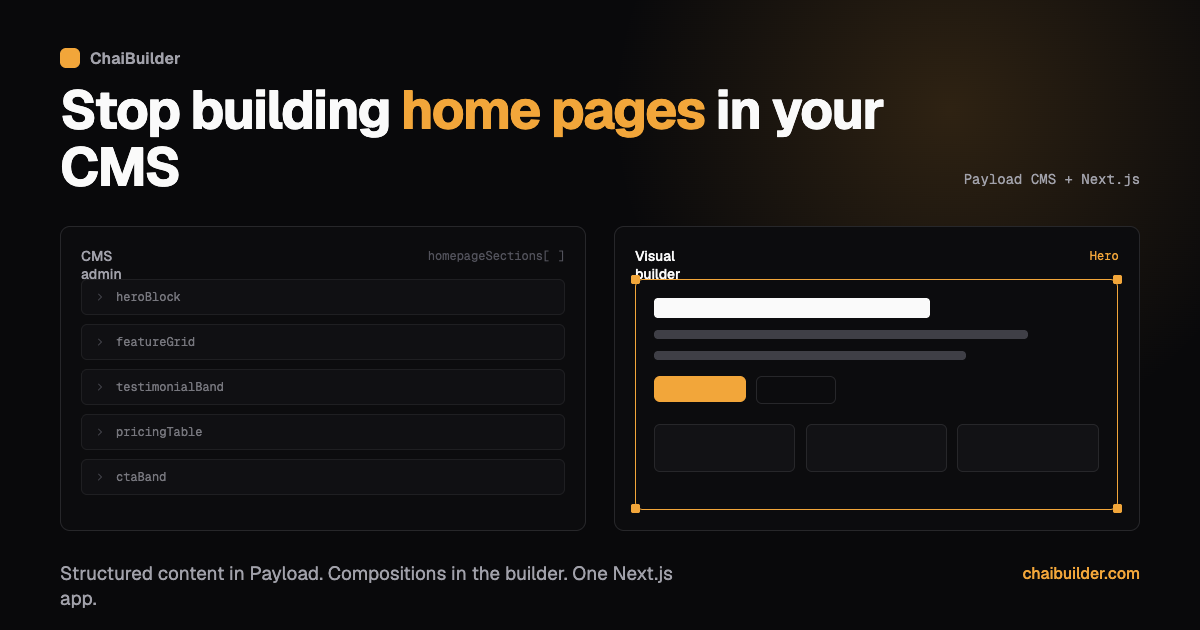
Force the first kind into a CMS and you get what everyone in this industry has seen at least once: a homepageSections array with a discriminated union of forty block types, a blockType field, and a Payload admin panel where a marketer builds the home page by dragging collapsed grey accordion rows around and clicking Preview to find out what they did. Force the second kind into a page builder and you get four hundred hand-built pages, a redesign nobody will approve, and a content team that copies the last post and edits over it.
ChaiBuilder is built on refusing to pick. Visual pages live in the builder. Structured content lives in Payload. Neither one owns the other, and four small mechanisms wire them together at render time.
This post is about those mechanisms, and about the parts of the design that are trade-offs rather than wins.
The split
| Visual pages | Structured content | |
|---|---|---|
| Edited in | The visual builder | The Payload admin panel |
| Shape | A tree of blocks | Typed fields on a collection |
| Layout | Unique per page, editor controlled | None, supplied by whatever renders it |
| Good for | Home, landing, pricing, campaign pages | Blog posts, docs, legal, jobs, team |
| Stored in | ChaiBuilder's own page tables | Payload collections |
| Scales by | Adding pages by hand | Adding records |
The rule of thumb is short enough to keep in your head: if you would design it once and fill it in many times, it is structured content. If each one is its own composition, it is a visual page.
Both live in the same database. There is no sync process, no content mirror, no second service to keep alive. And there is no hard foreign key between a page row and a collection record either. The connection is made at render time, which is the design decision the rest of this post follows from.
If you find yourself duplicating a visual page and changing only the words, you wanted structured content. If you find yourself adding fields to a collection so it can control its own layout, you wanted a visual page. Both mistakes are cheap to reverse early and expensive later, which is why this is the first modelling decision worth spending an hour on.
Payload stays Payload
The important thing about the CMS half is what is not done to it.
ChaiBuilder does not fork Payload, wrap its admin panel, or re-expose a subset of its API through a friendlier facade. Payload runs as Payload, in your app, at your admin route. You write collections as CollectionConfig objects the way the Payload docs tell you to. Access control is Payload's access control. Hooks are Payload's hooks. Payload plugins install normally. Payload's own draft and publish is what your editors use for records, not a parallel workflow ChaiBuilder invented.
This matters for a boring commercial reason: everything your team already knows about Payload, and everything the Payload community publishes, keeps working. When a tool wraps a CMS, the wrapper becomes the thing you have to learn, the thing that lags upstream releases, and the thing that eventually blocks a feature you need. There is nothing to lag here, because the integration is not a wrapper. It is a short list of collections you hand to a config file.
The builder's dependency on Payload is deliberately thin: it needs to know which collections back dynamic pages, and which collections a list block is allowed to iterate. That is close to the whole contract, and it is why the section near the end of this post about swapping Payload out is short.
The four bridges
Structured content is useless if it cannot reach a page, and a visual page is a brochure if it can only show hand-typed text. Four mechanisms connect the two halves.
1. Page types: one layout, many records
A page type is a visually designed page that acts as the layout for every record in a collection. You build /blog/[slug] once in the builder. A data provider turns the incoming URL into one record and hands its fields to the render.
The consequence worth pausing on: changing how every blog post looks is a visual edit, not a deploy. There is no app/blog/[slug]/page.tsx full of JSX that a developer owns. The layout is stored page JSON, edited in the builder, with its own drafts and revisions like any other page. When marketing wants the author byline above the title instead of below it, that is a five minute change by the person who wants it, at a time that has nothing to do with your release schedule.
A page type is not a Next.js route. Your routing is untouched: a catch-all public route resolves any slug, and the page type describes the shape of a slug rather than a file in your app directory.
2. Data binding: fields into blocks
Inside the layout, {{ }} bindings pull values out of the current record:
{{blog.title}}
{{blog.author.name}}
{{blog.publishedAt | date 'long'}}
{{blog.subtitle | default 'Read more'}}
Bindings resolve on the server, at render time, so a bound page is still a static, cacheable page. They work in block text, link URLs, image sources, SEO fields, and JSON-LD, which is usually where a dynamic page needs them most.
There is no JavaScript inside a binding. No arithmetic, no ternaries, no method calls, no ??. A binding is a data path plus optional pipes (uppercase, date, currency, join, default, and your own registered ones), and anything more complicated belongs in the provider that produced the value.
That is a real constraint and it is worth being honest about why it exists. Bindings are authored by editors, in a text field, and they execute on your server during every render. Keeping the syntax small enough to validate completely, rather than evaluate, is what makes it safe to hand that field to a marketer. Derived values move upstream into the provider, where they are computed once per request instead of once per binding, which is where they belonged anyway.
3. Repeaters: many records inside one page
A Repeater block iterates a collection and renders its children once per record, with {{$index.title}} addressing the current item. This is how a visual page shows a post grid, a team page, or a table of releases, and it is the mechanism that lets a hand-composed landing page include a live slice of structured content without a developer.
4. Global data: the site-wide singleton
A global provider supplies one object to every render, available as {{global.*}}. Company name, contact details, social links, tracking snippets. One value, one place, used by every page. It is also the only provider that is cached persistently across renders, which makes it the right home for anything expensive and site-wide.
Wiring it up
All four are declared in one config file:
import { asChaiBuilderGlobalProvider, buildChaiBuilderConfig } from 'chaipro/payload'
import { Blog } from '@/collections/Blog'
import { Legal } from '@/collections/Legal'

export default buildChaiBuilderConfig({
  // Site-wide data, available as {{global.*}}
  globalDataProvider: asChaiBuilderGlobalProvider({ slug: 'site-config' }),

  // Dynamic pages backed by a collection
  pageTypes: [
    {
      collection: Blog,
      helpText: 'A blog post page',
      dynamicSegments: '/[a-zA-Z0-9-]+',
      dataProviderDepth: 2,
    },
  ],

  // Collections a Repeater is allowed to list
  collections: [Blog, Legal],
})
Blog there is your ordinary Payload collection, imported from wherever you keep it. A collection adapted this way is exposed under its singular camel-cased name, so a collection with slug blog binds as {{blog.title}} and one with slug case-studies binds as {{caseStudy.title}}. dataProviderDepth: 2 is what populates related documents, and the difference between {{blog.author.name}} resolving to a name and resolving to a document id.
That is the integration. A developer writes this once per project, and from then on the editor sees a blog tree in the binding picker and never thinks about Payload again.
The two halves publish independently
This is the part that surprises people, and it is usually what they wanted once they see it.
A page has a draft row and a published row. Visitors only ever see the published row, and publishing copies one to the other and invalidates that page's cache. A record follows Payload's own draft and publish, and saving one does not touch page rows at all.
So a writer publishes a blog post and it is live, with nobody publishing a page. And a designer restructures the blog layout, previews it against real records, and publishes when it is ready, without touching a single post. The redesign and the editorial calendar stop being coupled, which is the sort of thing you only notice you were paying for once you stop.
Keeping the two fresh is a cache-tag problem, and the provider is the only thing that knows which records it just read, so it says so:
dataProvider: async ({ pageProps }) => {
  const post = await findPost(pageProps.pageIdentifier)
  return {
    post,
    $cacheTags: [`posts-${siteId}`, ...(post ? [`posts-${siteId}-${post.id}`] : [])],
  }
}
Page type providers are not cached persistently, and that is the deliberate trade behind this: running the provider on every regeneration is what lets it declare per-record tags, so publishing one post invalidates exactly the pages that rendered it rather than every page of that type. You pay one query per regeneration to buy precise invalidation. Emit the broad collection-level tag even when the lookup misses, because a page cached before the record existed has no per-record tag to fire and the broad one is the only thing that can heal it.
The failure mode to know about
Everything on the binding path fails quietly, on purpose. A missing binding resolves to an empty string. A collection fetch that throws renders zero items and returns 200. A provider that returns nothing leaves a page rendering with blank text where content should be.
That is the right default for a cached public page, because one absent optional field should not take a page down, and it is a poor debugging experience. Two habits cover most of it: toggle binding preview off in the canvas to read the raw bindings on a block and confirm what it is actually bound to, and give optional fields a fallback with | default. When a section is mysteriously blank, suspect the provider before the block.
Swapping the CMS
Payload is the default because the starter ships it wired in and it is the only first-party integration. It is not a requirement.
What the builder actually depends on are two config contracts, page types and collections, each backed by a function you write. A page type provider is any async function that returns an object. A collection is any object with a fetch that returns { items, totalItems }. Point those at Supabase, an existing headless API, a git repository of markdown, or a filesystem, and the builder cannot tell the difference. Our own documentation site is exactly this: the docs are markdown files in a repo, and they expose the same binding surface to the builder that a Payload collection would.
What you give up by leaving Payload is the wiring the starter provides for free: the admin UI your content team logs into, collection scoping per site, and automatic revalidation when a record changes. For a team that already has a CMS and a content team trained on it, that is often a good trade. For a team starting fresh, rebuilding an admin panel to avoid one dependency is not.
Where this runs
All of it, in your own Next.js app. The builder installs as a package, Payload runs in the same app, both write to the database you point them at, and the whole thing deploys anywhere Next.js runs. Preview goes through Next.js draft mode, so persistent caching is off on that path and an editor never previews yesterday's data. Publishing happens in the builder.
No content sits in our database. There is no service between your app and your users that we operate.
Where this is the wrong shape
Two cases, stated plainly, because a post like this is worth less if every section is a win.
If every page on the site is a record, you may not need the builder half at all. A pure publication, a docs-only site, a news archive: Payload with hand-written React templates is a smaller stack, and the visual layer earns nothing when there is no composition work to do. The split pays off when both kinds of content exist and different people own them.
If each record needs its own layout, page types are not the mechanism. One layout serves the whole type by design. Give an editor per-record layout control and you have re-created the forty-block union in a different file. When a handful of records genuinely need to be different, the honest answer is that those are visual pages that happen to live under /blog/, and modelling them that way is cheaper than bending the type.
There is a third thing worth knowing rather than arguing about: providers run once per render and the result is shared by everyone who gets that cached page. Cookies, geolocation, and logged-in state do not belong there. Per-visitor behavior is client-side work in a custom block, not a binding.
Recap
Two content models, because websites genuinely have two kinds of content. Visual pages in the builder, where the layout is the content. Structured content in Payload, unwrapped and unforked, where the fields are the content. Page types, bindings, repeaters, and global data connecting them at render time, in a config file a developer writes once.
The result is a boundary that follows the org chart. Developers own collections, providers, and custom blocks. Editors own layouts and pages. Writers own records. Nobody waits on anybody for the work that is properly theirs.
The full technical detail is in the docs: Pages vs CMS for the model, Page Types and Data Providers for the bridges, and Data Binding for the syntax your editors will actually type. To see the whole thing running against a real database, start at /start.